The Rust SDK is the primary application integration surface for Stoffel 0.1.0. It lives in the stoffel repository at crates/stoffel-rust-sdk.
  • Cargo package name: stoffel-rust-sdk
  • Rust library crate name: stoffel
  • Common import: use stoffel::prelude::*;
Stoffel 0.1.0 Rust SDKThe Rust SDK is the primary application API for the 0.1.0 release. Validate security and deployment assumptions for your application before going live.

What the SDK does

The SDK gives Rust applications a single API for:
  • compiling Stoffel Lang source;
  • loading compiled .stflb bytecode;
  • running clear local checks;
  • running local MPC testing;
  • passing named function inputs;
  • passing ClientStore-style local client inputs;
  • saving, loading, and summarizing bytecode;
  • generating network deployment configs;
  • building server/client handles for networked experiments;
  • collecting basic observability and error-category information.

Mental model

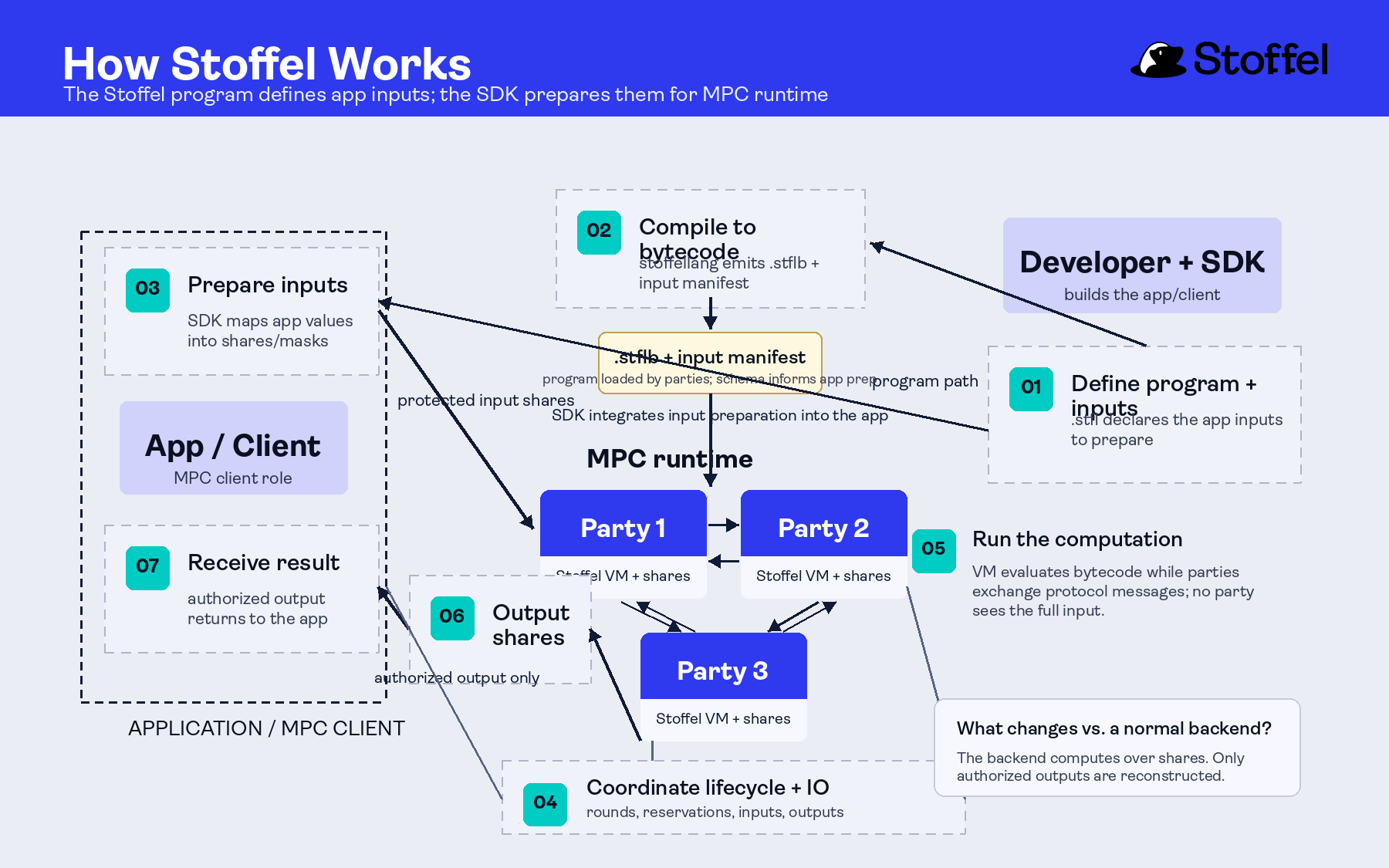
Rust SDK runtime paths from Rust application code through compile/load APIs into clear local execution, local MPC execution, and network handles. Campaign-style Stoffel workflow diagram showing how source programs, the build contract, coordinator-managed runtime, and application clients connect. Use Stoffel::compile(...) when the Rust app owns source compilation. Use Stoffel::load(...) or Stoffel::load_file(...) when the app should load a .stflb artifact built by the CLI. For app integrations, a common flow is to build bytecode with the CLI and load that artifact from Rust:
stoffel build
let result = Stoffel::load_file("target/debug/hello-mpc.stflb")?
    .parties(5)
    .threshold(1)
    .with_client_input(0, &[42_i64])
    .execute_local()
    .await?;

Clear local execution

Use clear execution to validate ordinary business logic quickly:
use stoffel::prelude::*;

fn main() -> stoffel::Result<()> {
    let result = Stoffel::compile("def main(a: int64, b: int64) -> int64:\n  return a + b")?
        .with_inputs(&[("a", 42_i64), ("b", 58_i64)])
        .execute_clear()?;

    println!("Result: {}", result[0]);
    Ok(())
}

Local MPC execution

Use local execution to test secret-value and MPC boundaries. The most reliable 0.1.0 smoke path uses Share inputs and opens only the intended output:
use stoffel::prelude::*;

#[tokio::main]
async fn main() -> stoffel::Result<()> {
    let source = r#"
def add_private_values(a: Share, b: Share) -> int64:
  var sum = Share.add(a, b)
  return sum.open()
"#;

    match Stoffel::compile(source)?
        .parties(5)
        .threshold(1)
        .with_inputs(&[("a", 42_i64), ("b", 58_i64)])
        .execute_local_function("add_private_values")
        .await
    {
        Ok(result) => println!("Local MPC named-input result: {}", result[0]),
        Err(stoffel::Error::Unsupported(message)) => println!("Local MPC unavailable: {message}"),
        Err(error) => return Err(error),
    }

    Ok(())
}
The local MPC path is exposed through the SDK and the stoffel CLI workflows. It runs several MPC nodes/processes locally on the developer machine.

Core APIs

Compile and load

Stoffel::compile(source)?
Stoffel::compile_file("src/main.stfl")?
Stoffel::load(bytecode)?
Stoffel::load_file("target/debug/program.stflb")?

Inputs

// Named function inputs.
.with_inputs(&[("a", 42_i64), ("b", 58_i64)])

// ClientStore slot inputs.
.with_client_input(0, &[42_i64])

Execution

.execute_clear()?                 // synchronous clear execution
.execute_local().await            // async local MPC execution
.execute_local_function("name")   // async local MPC named-function execution

MPC configuration

.parties(5)
.threshold(1)
.backend(MpcBackend::HoneyBadger)
.backend(MpcBackend::Avss { curve: Curve::Secp256k1 })
Current local and network MPC config validates parties >= 4 * threshold + 1. The common developer default is five parties and threshold one. Use MpcBackend::HoneyBadger when secret application values are field-compatible shares and the outside system consumes an opened result or client-output shares. Use MpcBackend::Avss { curve } when the output boundary needs public commitments, curve-encoded values, opened scalar responses, or signature-related artifacts. See MPC Backends for backend details.

Bytecode

let runtime = Stoffel::compile(source)?.build()?;
runtime.save_bytecode("program.stflb")?;
let summary = runtime.bytecode_summary()?;
let bytecode = runtime.program().to_bytecode()?;

Network and infrastructure surfaces

The SDK includes builders for network deployments and server/client handles. These APIs are useful for integration experiments and infrastructure planning:
let deployment = NetworkDeployment::builder([
    "127.0.0.1:19200",
    "127.0.0.1:19201",
    "127.0.0.1:19202",
    "127.0.0.1:19203",
    "127.0.0.1:19204",
])
.expected_clients(1)
.threshold(1)
.backend(MpcBackend::HoneyBadger)
.preprocessing(1000, 500)
.build()?;

let paths = deployment.save_toml_files("./network-configs")?;
let config = NetworkConfig::from_toml_file(&paths[0])?;
let server = StoffelServer::builder(0).network_deployment(&deployment).build()?;
let client = StoffelClient::builder().network_config(&config).build()?;
For most app developers, start with clear execution and local MPC before using network configuration directly. The same builders accept MpcBackend::Avss { curve: Curve::Bls12_381 } for AVSS network/client experiments supported by the current off-chain client I/O path. Use curve-specific AVSS examples when the external protocol fixes the curve or verifier-facing artifact.

Observability and errors

The SDK exposes tracing config, server metrics, health status, and error categories:
let tracing = TracingConfig::builder()
    .service_name("stoffel-app")
    .ansi(false)
    .build();

let error = Error::Preprocessing("not enough triples".to_owned());
println!("category={} recoverable={}", error.category(), error.is_recoverable());
println!("tracing={:?}", tracing.summary());

Where to find examples

Examples are checked into the repository:
crates/stoffel-rust-sdk/examples/
Start with:
  • quickstart.rs
  • local_mpc_named_inputs.rs
  • local_mpc_client_input.rs
  • quickstart_mpc.rs for the direct secret int64 argument shape
  • bytecode_roundtrip.rs
  • network_config.rs
  • observability.rs

Next steps