> ## Documentation Index
> Fetch the complete documentation index at: https://docs.stoffelmpc.com/llms.txt
> Use this file to discover all available pages before exploring further.
# Rust SDK Overview
> Primary 0.1.0 application API for compiling, loading, and running Stoffel programs from Rust.
The Rust SDK is the primary application integration surface for Stoffel 0.1.0. It lives in the `stoffel` repository at `crates/stoffel-rust-sdk`.
* Cargo package name: `stoffel-rust-sdk`
* Rust library crate name: `stoffel`
* Common import: `use stoffel::prelude::*;`
**Stoffel 0.1.0 Rust SDK**
The Rust SDK is the primary application API for the 0.1.0 release. Validate security and deployment assumptions for your application before going live.
## What the SDK does
The SDK gives Rust applications a single API for:
* compiling Stoffel Lang source;
* loading compiled `.stflb` bytecode;
* running clear local checks;
* running local MPC testing;
* passing named function inputs;
* passing ClientStore-style local client inputs;
* saving, loading, and summarizing bytecode;
* generating network deployment configs;
* building server/client handles for networked experiments;
* collecting basic observability and error-category information.
## Mental model

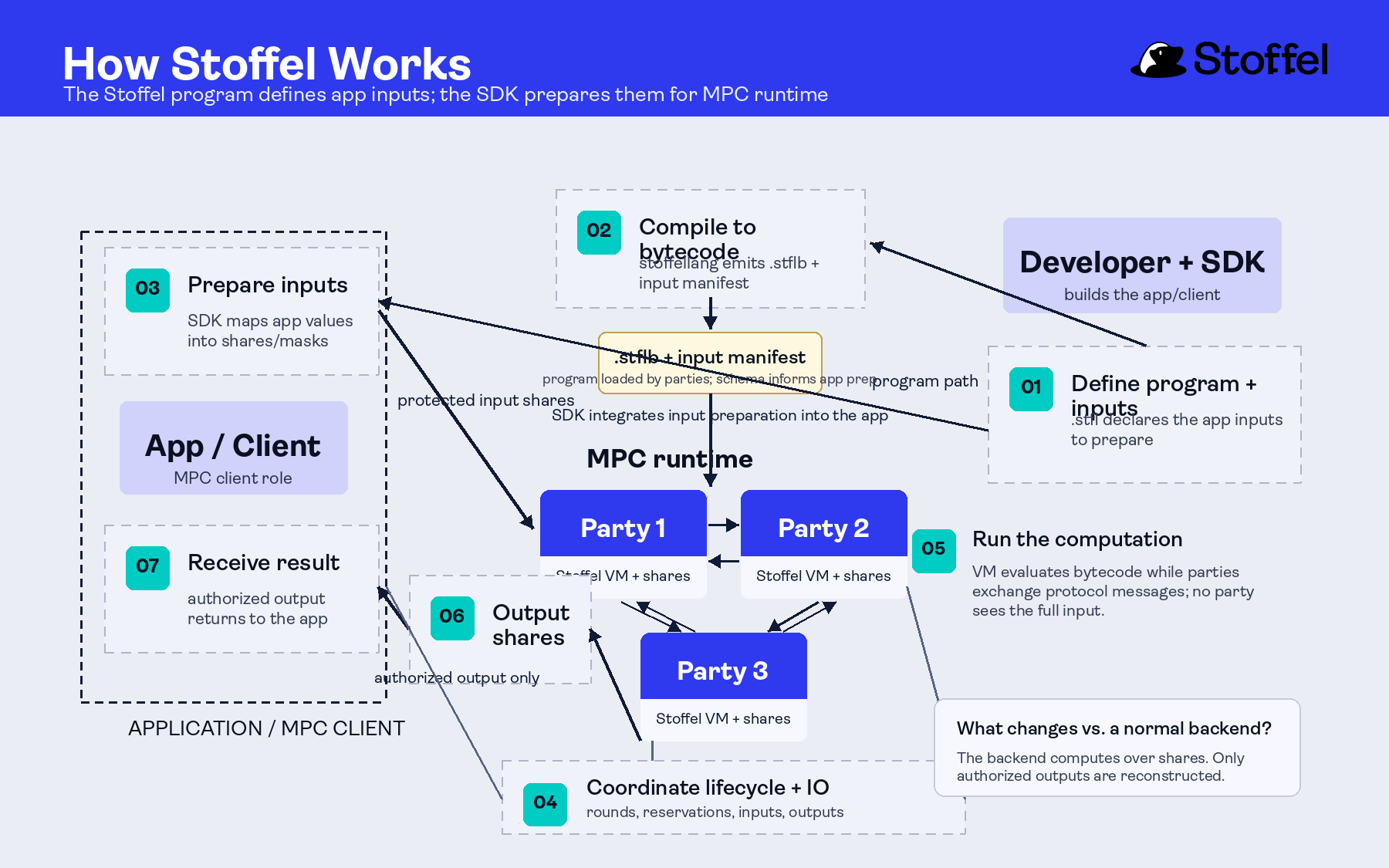 Use `Stoffel::compile(...)` when the Rust app owns source compilation. Use `Stoffel::load(...)` or `Stoffel::load_file(...)` when the app should load a `.stflb` artifact built by the CLI.
For app integrations, a common flow is to build bytecode with the CLI and load that artifact from Rust:
```bash theme={null}
stoffel build
```
```rust theme={null}
let result = Stoffel::load_file("target/debug/hello-mpc.stflb")?
.parties(5)
.threshold(1)
.with_client_input(0, &[42_i64])
.execute_local()
.await?;
```
## Clear local execution
Use clear execution to validate ordinary business logic quickly:
```rust theme={null}
use stoffel::prelude::*;
fn main() -> stoffel::Result<()> {
let result = Stoffel::compile("def main(a: int64, b: int64) -> int64:\n return a + b")?
.with_inputs(&[("a", 42_i64), ("b", 58_i64)])
.execute_clear()?;
println!("Result: {}", result[0]);
Ok(())
}
```
## Local MPC execution
Use local execution to test secret-value and MPC boundaries. The most reliable 0.1.0 smoke path uses `Share` inputs and opens only the intended output:
```rust theme={null}
use stoffel::prelude::*;
#[tokio::main]
async fn main() -> stoffel::Result<()> {
let source = r#"
def add_private_values(a: Share, b: Share) -> int64:
var sum = Share.add(a, b)
return sum.open()
"#;
match Stoffel::compile(source)?
.parties(5)
.threshold(1)
.with_inputs(&[("a", 42_i64), ("b", 58_i64)])
.execute_local_function("add_private_values")
.await
{
Ok(result) => println!("Local MPC named-input result: {}", result[0]),
Err(stoffel::Error::Unsupported(message)) => println!("Local MPC unavailable: {message}"),
Err(error) => return Err(error),
}
Ok(())
}
```
The local MPC path is exposed through the SDK and the `stoffel` CLI workflows. It runs several MPC nodes/processes locally on the developer machine.
## Core APIs
### Compile and load
```rust theme={null}
Stoffel::compile(source)?
Stoffel::compile_file("src/main.stfl")?
Stoffel::load(bytecode)?
Stoffel::load_file("target/debug/program.stflb")?
```
### Inputs
```rust theme={null}
// Named function inputs.
.with_inputs(&[("a", 42_i64), ("b", 58_i64)])
// ClientStore slot inputs.
.with_client_input(0, &[42_i64])
```
### Execution
```rust theme={null}
.execute_clear()? // synchronous clear execution
.execute_local().await // async local MPC execution
.execute_local_function("name") // async local MPC named-function execution
```
### MPC configuration
```rust theme={null}
.parties(5)
.threshold(1)
.backend(MpcBackend::HoneyBadger)
.backend(MpcBackend::Avss { curve: Curve::Secp256k1 })
```
Current local and network MPC config validates `parties >= 4 * threshold + 1`. The common developer default is five parties and threshold one.
Use `MpcBackend::HoneyBadger` when secret application values are field-compatible shares and the outside system consumes an opened result or client-output shares. Use `MpcBackend::Avss { curve }` when the output boundary needs public commitments, curve-encoded values, opened scalar responses, or signature-related artifacts. See [MPC Backends](../mpc-protocols/overview) for backend details.
### Bytecode
```rust theme={null}
let runtime = Stoffel::compile(source)?.build()?;
runtime.save_bytecode("program.stflb")?;
let summary = runtime.bytecode_summary()?;
let bytecode = runtime.program().to_bytecode()?;
```
## Network and infrastructure surfaces
The SDK includes builders for network deployments and server/client handles. These APIs are useful for integration experiments and infrastructure planning:
```rust theme={null}
let deployment = NetworkDeployment::builder([
"127.0.0.1:19200",
"127.0.0.1:19201",
"127.0.0.1:19202",
"127.0.0.1:19203",
"127.0.0.1:19204",
])
.expected_clients(1)
.threshold(1)
.backend(MpcBackend::HoneyBadger)
.preprocessing(1000, 500)
.build()?;
let paths = deployment.save_toml_files("./network-configs")?;
let config = NetworkConfig::from_toml_file(&paths[0])?;
let server = StoffelServer::builder(0).network_deployment(&deployment).build()?;
let client = StoffelClient::builder().network_config(&config).build()?;
```
For most app developers, start with clear execution and local MPC before using network configuration directly.
The same builders accept `MpcBackend::Avss { curve: Curve::Bls12_381 }` for AVSS network/client experiments supported by the current off-chain client I/O path. Use curve-specific AVSS examples when the external protocol fixes the curve or verifier-facing artifact.
## Observability and errors
The SDK exposes tracing config, server metrics, health status, and error categories:
```rust theme={null}
let tracing = TracingConfig::builder()
.service_name("stoffel-app")
.ansi(false)
.build();
let error = Error::Preprocessing("not enough triples".to_owned());
println!("category={} recoverable={}", error.category(), error.is_recoverable());
println!("tracing={:?}", tracing.summary());
```
## Where to find examples
Examples are checked into the repository:
```text theme={null}
crates/stoffel-rust-sdk/examples/
```
Start with:
* `quickstart.rs`
* `local_mpc_named_inputs.rs`
* `local_mpc_client_input.rs`
* `quickstart_mpc.rs` for the direct `secret int64` argument shape
* `bytecode_roundtrip.rs`
* `network_config.rs`
* `observability.rs`
## Next steps
* [Install the Rust SDK](./installation)
* [Run SDK examples](./examples)
* [Use the CLI](../cli/overview)
Use `Stoffel::compile(...)` when the Rust app owns source compilation. Use `Stoffel::load(...)` or `Stoffel::load_file(...)` when the app should load a `.stflb` artifact built by the CLI.
For app integrations, a common flow is to build bytecode with the CLI and load that artifact from Rust:
```bash theme={null}
stoffel build
```
```rust theme={null}
let result = Stoffel::load_file("target/debug/hello-mpc.stflb")?
.parties(5)
.threshold(1)
.with_client_input(0, &[42_i64])
.execute_local()
.await?;
```
## Clear local execution
Use clear execution to validate ordinary business logic quickly:
```rust theme={null}
use stoffel::prelude::*;
fn main() -> stoffel::Result<()> {
let result = Stoffel::compile("def main(a: int64, b: int64) -> int64:\n return a + b")?
.with_inputs(&[("a", 42_i64), ("b", 58_i64)])
.execute_clear()?;
println!("Result: {}", result[0]);
Ok(())
}
```
## Local MPC execution
Use local execution to test secret-value and MPC boundaries. The most reliable 0.1.0 smoke path uses `Share` inputs and opens only the intended output:
```rust theme={null}
use stoffel::prelude::*;
#[tokio::main]
async fn main() -> stoffel::Result<()> {
let source = r#"
def add_private_values(a: Share, b: Share) -> int64:
var sum = Share.add(a, b)
return sum.open()
"#;
match Stoffel::compile(source)?
.parties(5)
.threshold(1)
.with_inputs(&[("a", 42_i64), ("b", 58_i64)])
.execute_local_function("add_private_values")
.await
{
Ok(result) => println!("Local MPC named-input result: {}", result[0]),
Err(stoffel::Error::Unsupported(message)) => println!("Local MPC unavailable: {message}"),
Err(error) => return Err(error),
}
Ok(())
}
```
The local MPC path is exposed through the SDK and the `stoffel` CLI workflows. It runs several MPC nodes/processes locally on the developer machine.
## Core APIs
### Compile and load
```rust theme={null}
Stoffel::compile(source)?
Stoffel::compile_file("src/main.stfl")?
Stoffel::load(bytecode)?
Stoffel::load_file("target/debug/program.stflb")?
```
### Inputs
```rust theme={null}
// Named function inputs.
.with_inputs(&[("a", 42_i64), ("b", 58_i64)])
// ClientStore slot inputs.
.with_client_input(0, &[42_i64])
```
### Execution
```rust theme={null}
.execute_clear()? // synchronous clear execution
.execute_local().await // async local MPC execution
.execute_local_function("name") // async local MPC named-function execution
```
### MPC configuration
```rust theme={null}
.parties(5)
.threshold(1)
.backend(MpcBackend::HoneyBadger)
.backend(MpcBackend::Avss { curve: Curve::Secp256k1 })
```
Current local and network MPC config validates `parties >= 4 * threshold + 1`. The common developer default is five parties and threshold one.
Use `MpcBackend::HoneyBadger` when secret application values are field-compatible shares and the outside system consumes an opened result or client-output shares. Use `MpcBackend::Avss { curve }` when the output boundary needs public commitments, curve-encoded values, opened scalar responses, or signature-related artifacts. See [MPC Backends](../mpc-protocols/overview) for backend details.
### Bytecode
```rust theme={null}
let runtime = Stoffel::compile(source)?.build()?;
runtime.save_bytecode("program.stflb")?;
let summary = runtime.bytecode_summary()?;
let bytecode = runtime.program().to_bytecode()?;
```
## Network and infrastructure surfaces
The SDK includes builders for network deployments and server/client handles. These APIs are useful for integration experiments and infrastructure planning:
```rust theme={null}
let deployment = NetworkDeployment::builder([
"127.0.0.1:19200",
"127.0.0.1:19201",
"127.0.0.1:19202",
"127.0.0.1:19203",
"127.0.0.1:19204",
])
.expected_clients(1)
.threshold(1)
.backend(MpcBackend::HoneyBadger)
.preprocessing(1000, 500)
.build()?;
let paths = deployment.save_toml_files("./network-configs")?;
let config = NetworkConfig::from_toml_file(&paths[0])?;
let server = StoffelServer::builder(0).network_deployment(&deployment).build()?;
let client = StoffelClient::builder().network_config(&config).build()?;
```
For most app developers, start with clear execution and local MPC before using network configuration directly.
The same builders accept `MpcBackend::Avss { curve: Curve::Bls12_381 }` for AVSS network/client experiments supported by the current off-chain client I/O path. Use curve-specific AVSS examples when the external protocol fixes the curve or verifier-facing artifact.
## Observability and errors
The SDK exposes tracing config, server metrics, health status, and error categories:
```rust theme={null}
let tracing = TracingConfig::builder()
.service_name("stoffel-app")
.ansi(false)
.build();
let error = Error::Preprocessing("not enough triples".to_owned());
println!("category={} recoverable={}", error.category(), error.is_recoverable());
println!("tracing={:?}", tracing.summary());
```
## Where to find examples
Examples are checked into the repository:
```text theme={null}
crates/stoffel-rust-sdk/examples/
```
Start with:
* `quickstart.rs`
* `local_mpc_named_inputs.rs`
* `local_mpc_client_input.rs`
* `quickstart_mpc.rs` for the direct `secret int64` argument shape
* `bytecode_roundtrip.rs`
* `network_config.rs`
* `observability.rs`
## Next steps
* [Install the Rust SDK](./installation)
* [Run SDK examples](./examples)
* [Use the CLI](../cli/overview)